Time Slots Rules
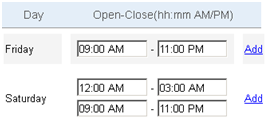
Both permanent and temporary schedules can have more than one set of multiple time intervals (open/close times) for each day of the week and has a unique set of rules; known as time slots. Time slots must be entered in chronological order. If you are adding a new time slot that occurs before the listed time slot, you will need to reorder the time slot so that the earliest open time occurs first within the day. All remaining time slots must also be in the order that they occur.
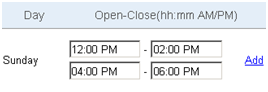
The following displays the site's earliest open time is 12:00 PM, closes at 2:00pm; reopens at 4:00PM and the site closes for the day at 6:00 PM.
Time Slots that span after Midnight
Each day that has an Open time interval must have a Close time interval, even if the close time occurs after midnight. Adding a time slot allows you to enter an open time on the day before the site closes.
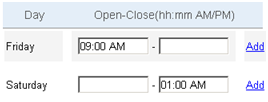
The following example shows a site opening at 9:00 AM on Friday and closing at 1:00 AM on Saturday.
Time Slots based on the Open Time Interval
Each open time must be entered on the actual day it occurs. To add a new time slot that starts after midnight, you must add it to the next calendar day.
The following example shows a site opening on Friday at 9:00 AM, closing Saturday at 11:00 PM; normal store hours. Once a month, inventory takes place after business hours on Friday. Inventory hours need to be scheduled for the site and is done by entering time slots for Saturday.