Editing Level Structure
When a company adds additional site locations in DataSource, the Administrator can modify the Level Structure to accommodate the new sites. This is done to reorganize the company’s Level Structure to accommodate the change.
-
If you add sites to your account or reorganize your company, you will need to update your Level Structure.
-
Only one person at a time can modify the Level Structure.
-
When a user accesses Edit Level Structure, the Level Structure is locked until the changes are committed or reset.
-
Level Structure changes affect the view of your Level Structure and all reports. The changes are applied in real-time.
To add a site location to the Level Structure and make edits:
-
Click the Account tab from the navigation bar.
-
Select the Edit Level Structure tab.
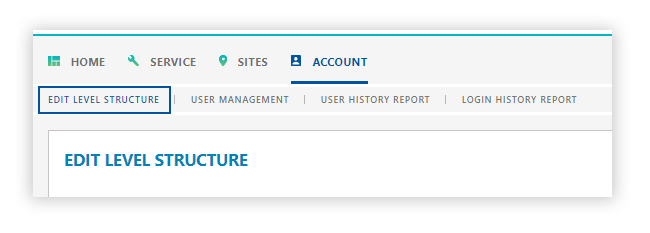
The Edit Level Structure panel is displayed.

-
Click Edit Level Structure in the righthand corner of the Edit Level Structure panel.
The view of the Edit Level Structure panel is determined by the Level Structure you selected and the site status.
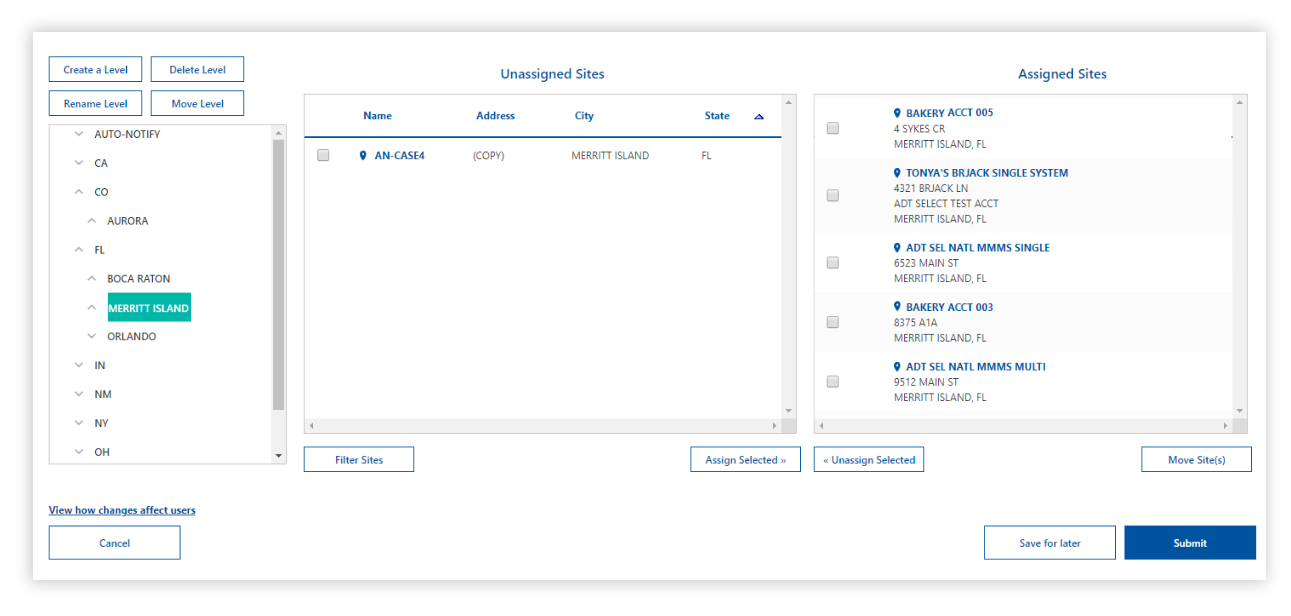
Once you are in the Edit Level Structure panel, you can perform the following tasks:
Assign a Site to the Level Structure
-
Determine and select the desired site level from the Level Structure panel.
-
To assign a site location to an existing site level, select the site from the Unassigned Sites section.
-
Click Assign Site(s).
- The selected site appears in the Sites for [site] level section.
- The Site(s) assigned successfully message appears.
-
Click Submit.
Remove a Site from the Level Structure
-
Determine and select the desired site level from the Level Structure panel.
-
To remove a site location from an existing site level, select the site from the Sites for [site] level section.
-
Click Unassign Site(s).
- The selected site appears in the Unassigned Sites section.
- The Site(s) assigned successfully message appears.
-
Click Submit.
Create a Site Level in the Level Structure
-
Select the site level from the Level Structure panel.
-
Enter the desired name for the site level in the Level name box.
-
Click Submit.
- The site level appears in the Level Structure panel.
- The Level [site level] created successfully message appears.
-
Click Submit.
Rename a Site Level in the Level Structure
-
Select the site level from the Level Structure panel.
-
Click Rename Level.
-
Enter the desired name for the site level in the Level name box.
-
Click Submit.
- The site level replaces the name in the Level Structure panel.
- The Level renamed successfully message appears.
Delete a Site from the Level Structure
-
Determine and select the desired site level from the Level Structure panel.
-
To delete a site location from an existing site level, select the site from the Sites for [site] level section.
-
Click Unassign Site(s).
- The selected site appears in the Unassigned Sites section.
- The Site(s) assigned successfully message appears.
-
Click Submit.
Reposition a Site in the Level Structure
-
Determine and select the desired site level from the Level Structure panel.
-
To move a site location in the level structure to a new location, select the site from the Sites for [site] level section.
-
Click Move Site(s).
- The site location appears in the Move Site(s) section.
-
Select the desired destination level and click Move Site(s).
-
Click Submit.