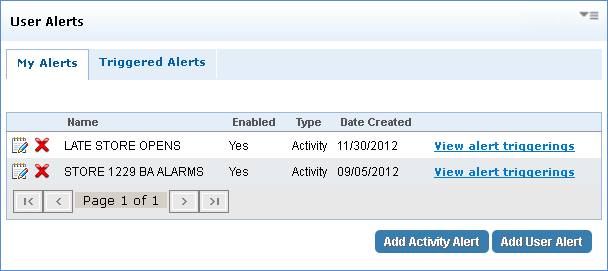
About My Alerts
The My Alerts section contains the User Alerts panel which manages user-specific activity & user alerts, and notifies you of any problems with your sites or users. Within the My Alerts tab, you can view, edit, and delete activity & user alerts. The Triggered Alerts tab displays alerts that produced an outcome based on the value (number of days) entered when creating the alert. In addition, you are notified by triggered alerts through email; triggered alerts appear in the Notifications Dashboard and saved in the alert history.
When used in conjunction with User Search and Level Structure panels, administrators can use this tool to create, edit and manage alerts to monitor a user's activity. Users can create, edit, and manage their own activity & users which are based on the site levels they are assigned to. Only administrators have access to the User Search and Level Structure panels.
 To access the My Alerts section, click User Management from the Navigation bar and select the My Alerts tab.
Click the desired area in the image to display more information.