About User Management
The User Management section gives administrators complete access and control in managing user profile accounts, alerts, and view historical information about the user. Administrators can add, edit, copy, delete, and change a user's account status, create and modify user & activity alerts, and generate the history of users that are assigned to their site levels.
Users can view and change personal information in their user profile (e.g. password, e-mail address, and contact information), create and view alerts & history, and view the history of other users who are assigned to their site levels.
 To access the User Management section, click User Management from the Navigation bar and select the desired tab. By default, the User Management tab is displayed showing you the Level Structure, User Profile, User Search, and Site Data panels.
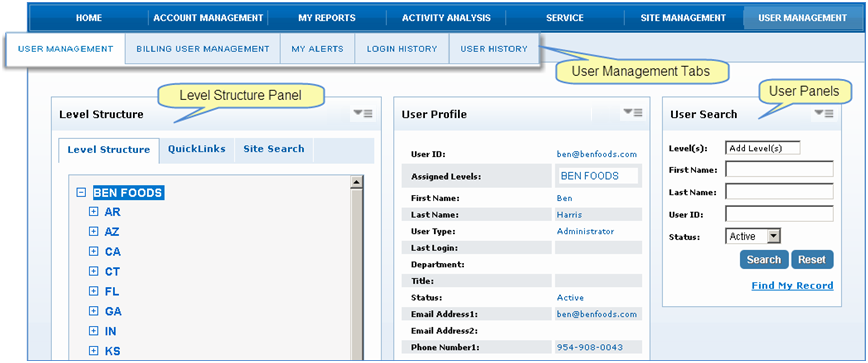
There are five tabs in the User Management section that provides detailed information for the administrator to manage their user's activities.
-
User Management - Used to search and manage DataSource user profiles. Administrators can create, edit and copy user profiles for new and existing users, and search for user's by site levels. Users can change their personal information; email address, phone number and update their password.
-
My Alerts - Manages the activity & user alerts associated with your sites. Administrators can search for users by assigned site levels, and view alerts associated with the user. Users can only create, edit, and delete alerts for activity & user alerts they created.
-
Login History - Administrators can search for users by assigned site level and displays a historical report of the user's login activity. Users can only search for their login history by using a date range criteria.
-
User History - Administrators and users can search for a user's history using a User ID or Last Name and generate a report showing the results. In addition, you can view other users who have used the same search criteria.
-
Billing User Management - Used only for billing accounts. Commercial account users with billing rights can manage billing needs.